
Risk warning: CFDs are complex instruments and come with a high risk of losing money rapidly due to leverage. The majority of retail investor accounts lose money when trading CFDs. You should consider whether you understand how CFDs work and whether you can afford to take the high risk of losing your money. This page is general information, not financial advice. Advertiser disclosure.
I believe Pepperstone paired with MetaTrader expert advisors is the best automated trading platform for UK traders, combining low raw spreads with full EA support at an FCA-regulated entity. Automated trading executes a rule-based strategy without manual intervention. This page ranks eight automation routes by broker, platform and running cost. We hold live, FCA-regulated accounts with the brokers here; the running-cost figures below are advertised, dated at capture, and set out as a desk-based assessment of each broker’s published UK pricing. You can compare them in the grid.
What is the best automated trading platform in the UK?
I think Pepperstone with MetaTrader 4 expert advisors is the best automated trading setup in the UK, pairing a low-cost raw account with the largest EA library. Vantage suits low-commission MT5 automation, and FxPro runs C# cBots on cTrader Automate. The right route depends on whether you code, buy an EA or use a no-code tool.
We have arranged each pairing to match an automation route to an in-set FCA-regulated broker. I encourage you to follow the links to the lean cards below, and the comparison grid and cards carry the full broker reviews.
- MT4 EAs with Pepperstone: the broadest expert-advisor route.
- MT5 EAs with Vantage: low-commission automation, multi-thread backtesting.
- cTrader Automate with FxPro: C# cBots on raw execution.
- ProRealTime with IG Markets: server-side ProOrder strategies.
- Capitalise.ai with FXCM: plain-English automation, no coding.
- TWS and API with Interactive Brokers: self-built multi-asset systems.
- eToro CopyTrader: copy-based automation, not coded rules.
- MetaTrader signals with City Index: signal-based automation.
Comparison grid: eight automation routes
I think the grid covers the practical points that matter to you: whether you need to code, whether you can test a strategy before it goes live, what the route typically adds in running cost, and the FCA-regulated broker behind the account.
| Route | Broker | Coding needed | Backtesting | Typical extra cost | FCA-regulated |
|---|---|---|---|---|---|
| MetaTrader 4 EAs | Pepperstone | MQL4, or buy a ready-built EA | Single-thread strategy tester | EA optional; MetaTrader VPS from US$15/mo (about £12 at current rates), or US$10/mo on a 12-month term | Yes |
| MetaTrader 5 EAs | Vantage | MQL5, or buy a ready-built EA | Multi-thread strategy tester | EA optional; same MetaTrader VPS, from US$15/mo (about £12), or US$10/mo on a 12-month term | Yes |
| cTrader Automate | FxPro | C# cBots | Built-in backtesting | None beyond standard account costs | Yes |
| ProRealTime ProOrder | IG Markets | ProBuilder scripting or point-and-click | ProBacktest | Platform fee that IG waives above an activity threshold (check current IG UK terms) | Yes |
| Capitalise.ai | FXCM | No code, plain English | Backtest and simulate | Free through FXCM, no separate charge and no published activity condition (verified 23 July 2026) | Yes |
| TWS and API | Interactive Brokers | API or your own code | Your own setup | None from IBKR; you supply your own infrastructure | Yes |
| eToro CopyTrader | eToro | No code, social copy | Not applicable | No separate copy fee on the copying side | Yes |
| MetaTrader signals | City Index | No code | Not applicable | Signal subscription, which varies by provider | Yes |








Route features and costs are taken from each provider’s published pages, including Capitalise.ai’s own site and the MQL5 VPS price list, accessed 10 July 2026, with the Capitalise.ai and MetaTrader VPS terms rechecked on 23 July 2026. These are advertised figures, not tested performance, and the running-cost figures are a desk-based assessment of each broker’s published UK pricing. Capitalise.ai is now part of Kraken, and its FXCM partnership page carries a 2021 copyright, so this routing sits on a semi-annual review cycle with the next check due January 2027. FXCM’s own VPS is a separate product and is not free: £30 a month for standard retail, complimentary only on Active Trader tier pricing. Re-verify current terms before building a strategy around any of them.
I like these lean cards because they summarise the broker behind each route. Scores come from our UK rating model, and each card links to the full broker review for you to read. You will find the full review useful.
1. Pepperstone: the widest expert-advisor route

CFDs carry high risk. Retail leverage is FCA-capped.
- Average spread
- 0.1 pips avg, Razor (raw), tested July 2026
- Trading platforms
- MT4, MT5, cTrader, TradingView, own platform
- Minimum deposit
- £10
- Regulation
- Pepperstone Limited (FRN 684312)
◎ Standout: the widest expert-advisor route
Why we recommend Pepperstone
Pepperstone Limited runs the largest expert-advisor library in the set on its Razor raw account, with spreads advertised from 0.0 pips plus a £2.25-per-side commission, and it permits expert advisors on retail accounts under its terms. EA performance is cost-sensitive, so a raw account keeps the per-trade drag low.
2. Vantage: low-commission MT5 automation

CFDs carry high risk. Retail leverage is FCA-capped.
- Average spread
- 0.08 pips avg, Raw ECN, tested July 2026
- Trading platforms
- MT4, MT5, TradingView, own platform
- Minimum deposit
- £50
- Regulation
- Vantage Global Prime LLP (FRN 590299)
◎ Standout: low-commission MT5 automation
Why higher here? Automation Fit weights automation routes, hosting and API access, which lifts Vantage above its #8 sitewide position. See the ranking method ↓
Why we recommend Vantage
Vantage Global Prime LLP (FCA FRN 590299) runs MT5 expert advisors on its Raw ECN account, with an advertised £1.00 per lot per side commission (£2.00 round turn, register-verified, vantagemarkets.co.uk checked 23 July 2026). The MT5 strategy tester runs multi-threaded, which shortens optimisation across large parameter sets, and EAs run on a low-commission raw account. It suits cost-focused traders automating FX and index strategies on MetaTrader.
3. FxPro: C# automation on cTrader

CFDs carry high risk. Retail leverage is FCA-capped.
- Average spread
- 0.64 pips avg, Raw+ (raw), tested July 2026
- Trading platforms
- MT4, MT5, cTrader, TradingView, own platform
- Minimum deposit
- £0
- Regulation
- FxPro UK Limited (FRN 509956)
◎ Standout: C# automation on cTrader
Why higher here? Automation Fit weights automation routes, hosting and API access, which lifts FxPro above its #15 sitewide position. See the ranking method ↓
Why we recommend FxPro
FxPro UK Limited runs cTrader Automate, where strategies are written as C# cBots on no-dealing-desk execution with depth of market visible to the algorithm. It suits coders who prefer C# to MQL and want order-book detail in their logic.
4. IG Markets: server-side ProOrder strategies

CFDs carry high risk. Retail leverage is FCA-capped.
- Average spread
- 1.13 pips avg, IG Trading (spread-only), tested July 2026
- Trading platforms
- MT4, MT5, own platform
- Minimum deposit
- None published
- Regulation
- IG Markets Limited (FRN 195355)
◎ Standout: server-side ProOrder strategies
Why higher here? Automation Fit weights automation routes, hosting and API access, which lifts IG Markets above its #9 sitewide position. See the ranking method ↓
Why we recommend IG Markets
IG Markets Limited offers ProRealTime, whose ProOrder engine runs strategies server-side, built point-and-click or scripted in ProBuilder. Because the strategy runs on IG's servers, you avoid the local-uptime worries that come with running an EA on your own machine or VPS.
5. FXCM: no-code automation with Capitalise.ai

CFDs carry high risk. Retail leverage is FCA-capped.
- Average spread
- 0.2 pips avg, Active Trader (raw), tested July 2026
- Trading platforms
- MT4, TradingView, own platform
- Minimum deposit
- £50
- Regulation
- Stratos Markets Limited (FRN 217689)
◎ Standout: no-code automation with Capitalise.ai
Why higher here? Automation Fit weights automation routes, hosting and API access, which lifts FXCM above its #18 sitewide position. See the ranking method ↓
Why we recommend FXCM
FXCM, trading as Stratos Markets Limited, offers Capitalise.ai, which turns plain-English rules into automated orders with no code. You can backtest and simulate a strategy before it goes live, which makes it the lowest-barrier genuine automation route in this set.
6. Interactive Brokers: a full API for self-built systems

CFDs carry high risk. Retail leverage is FCA-capped.
- Average spread
- 0.1 pips avg, IBKR Pro, tested July 2026
- Trading platforms
- own platform, TradingView
- Minimum deposit
- £0
- Regulation
- Interactive Brokers (U.K.) Limited (FRN 208159)
◎ Standout: a full API for self-built systems
Why lower here? Automation Fit weights automation routes, hosting and API access, rather than the all-round strengths behind Interactive Brokers' #3 sitewide position. See the ranking method ↓
Why we recommend Interactive Brokers
Interactive Brokers (U.K.) Limited exposes a full API for self-built trading systems across asset classes through its TWS platform, not MetaTrader. Backtesting is whatever you build yourself, so the route suits programmers rather than beginners.
7. eToro: copy-based automation, not coded rules

CFDs carry high risk. Retail leverage is FCA-capped.
- Average spread
- 1 pips avg, Retail (spread-only), tested July 2026
- Trading platforms
- own platform
- Minimum deposit
- US$50
- Regulation
- eToro (UK) Ltd (FRN 583263)
◎ Standout: copy-based automation, not coded rules
Why higher here? Automation Fit weights automation routes, hosting and API access, which lifts eToro above its #27 sitewide position. See the ranking method ↓
Why we recommend eToro
eToro (UK) Ltd automates through CopyTrader, which mirrors another trader's positions rather than running coded rules. It removes the strategy-building step, but you take on full exposure to the copied trader's losses as well as their gains. The copy trading platforms guide covers this route in more depth.
8. City Index: subscription signals over MetaTrader

CFDs carry high risk. Retail leverage is FCA-capped.
- Average spread
- 1.4 pips avg, CFD (spread-only), tested July 2026
- Trading platforms
- MT4, TradingView, own platform
- Minimum deposit
- £0
- Regulation
- StoneX Financial Ltd (FRN 446717)
◎ Standout: subscription signals over MetaTrader
Why higher here? Automation Fit weights automation routes, hosting and API access, which lifts City Index above its #12 sitewide position. See the ranking method ↓
Why we recommend City Index
City Index, a StoneX Financial Ltd brand, routes third-party MetaTrader signals to your account with no code required. Provider quality varies, and past signal results do not predict future ones, so treat any track record with caution.
What is automated trading?
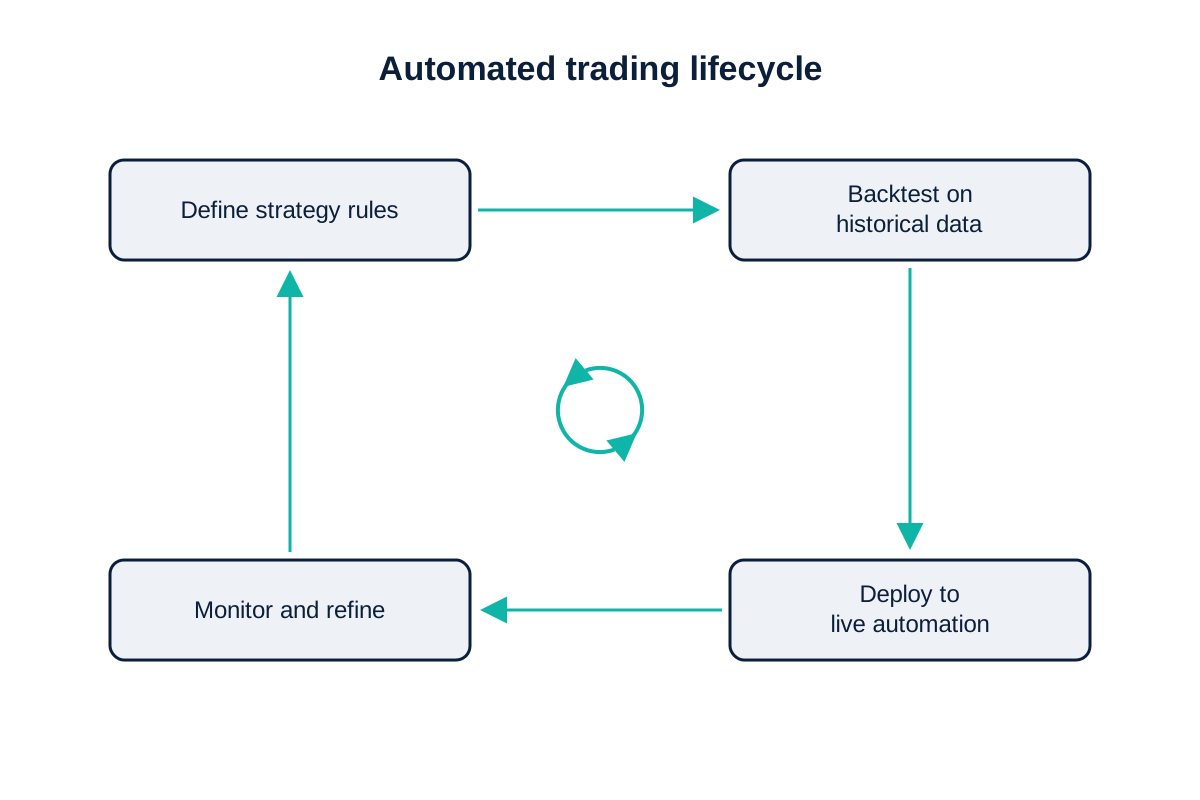
In my experience, automated trading uses software to execute a strategy without a human placing each order. You define rules for entry, exit and risk, and the system runs them on live prices. It covers expert advisors on MetaTrader, cBots on cTrader, ProRealTime ProOrder strategies, API-driven systems and no-code tools like Capitalise.ai. Tools that layer machine learning over these rules sit at the newer end of the market, ranked in the AI trading platforms guide. I recommend you read the expert advisor guide, which explains the most common route in detail.
How automated trading works
An automated system connects to your broker account and acts on a defined set of rules. It monitors prices, triggers entries and exits when the rules are met, and manages stops and targets, often around the clock with a VPS keeping it online. That uptime is a real running cost: the built-in MetaTrader VPS is advertised at US$15 a month, roughly £12 at current rates, on a rolling monthly plan, or US$10 a month on a 12-month term (MQL5 site, accessed 10 July 2026). The broker still executes every order on its own spreads and under FCA retail leverage caps, so automation changes who pulls the trigger, not the underlying cost or the market risk.
Benefits and risks of automated trading
Automation removes emotion and runs without supervision, but it does not remove risk and it adds new failure modes. In my view, a system trades to its rules without hesitation and can run strategies a human could not watch all day. The risks are real, and you need to understand them: a flawed rule loses money faster than a human would, a strategy that worked in backtesting can fail in live conditions, and a technical fault or a gapping market can produce outcomes the code never anticipated. No automated system is a guaranteed profit, and I would treat any tool that claims to be as a warning sign. You should be sceptical of any such claim.
Pros and cons of automated trading
In my experience, the trade-offs are straightforward. On the upside, automated systems execute consistently, react instantly, run continuously and can be backtested before going live. Against that, they depend entirely on the quality of the rules, can over-fit to past data, need your monitoring despite the “set and forget” promise, and remain exposed to the same leverage and market risk as manual trading. You should monitor them regularly.
How to choose a broker for automation
You should match the broker to the route. If you run MetaTrader EAs, I recommend you pick a low-cost MT4 or MT5 broker that permits automation and offers a VPS; because expert advisors trade often, a raw-execution ECN account keeps the per-trade cost down. Wanting cTrader Automate instead means choosing a cTrader broker like FxPro or Pepperstone. For ProRealTime or a trading API, the broker has to support that specific environment, which narrows the field. Our team confirms the automation features of each broker we review. If you would rather follow another trader than code a strategy, the copy trading platforms guide covers that route. I suggest you confirm the broker allows automated trading on a retail account before you build around it.
Compare brokers by the factor that decides it
I find that different traders rank on different things. Start from the factor that decides it for you.

Start with the overall ranking
Our main UK list scores every FCA-regulated broker on cost and execution.

Cost decides it
I want you to know that the same trade costs different amounts on different account types. These lists rank on the all-in figure.

The platform decides it
Pick your trading software first, then compare the brokers that carry it.

You are starting out
Simple platforms and demo accounts to learn on before any money is at risk.
Our reviews are reader-supported. We may receive payment when you click a link to a partner site. Learn how we make money.
FAQs
What is the best platform for automated trading in the UK?
Is automated forex trading legal in the UK?
Can automated trading guarantee a profit?
Do I need to know how to code to automate my trading?
How much does automated trading cost to run?
Can I automate trading on a demo account first?
Related pages
About the author

Justin Grossbard is the co-founder and CEO at CompareForexBrokers. He has traded forex since 1998, leads UK broker research and has personally reviewed every FCA-regulated broker on this site. His work has appeared in Forbes, Kiplinger and Finance Magnates, and he holds a Bachelor of Commerce (Honours) and a Master of Marketing.